Licence
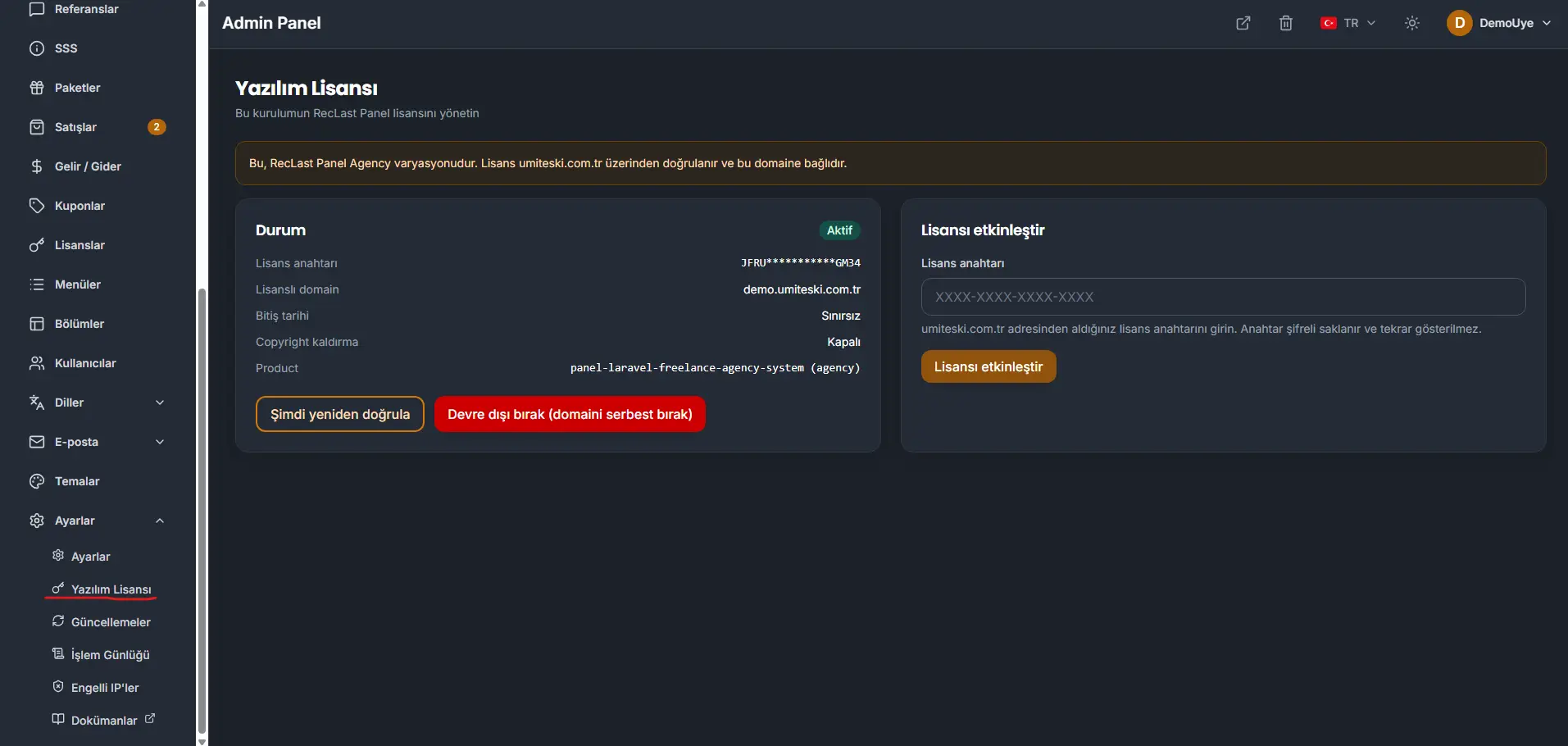
The license for this installation is under Settings → Software license. The screen names the variation and states that the license is checked through umiteski.com.tr and bound to this domain. The screenshot is the Agency variation.
Status
- Status. Active when the license checks out.
- License key. Stored encrypted. The screen shows it masked, and the full key is not shown again.
- Licensed domain. The production domain this installation is bound to.
- Expiry. Unlimited when the license has no end date.
- Copyright removal. Shows whether that option is turned on. In the screenshot it is off.
- Product. The variation code. In the screenshot this is
panel-laravel-freelance-agency-system(agency).
Verify now checks the license with umiteski.com.tr again.
Deactivate (release the domain) drops the license binding on this installation and frees the domain. Use it only when this domain should stop carrying the license.
Activate a license
Paste the key from the purchase on umiteski.com.tr and press Activate license. The key is stored encrypted and is not shown again.
Activating a key is a security check. It is counted the moment it succeeds, so the same key cannot be claimed by a second installation.
Activating a license counts as one use. The key cannot be activated again. After a clean installation, the same key is refused even on the same domain. The check keeps a key from being applied twice.
Before you remove the installation and set it up again, press Deactivate (release the domain) so the key is free for the new setup. If the installation is already gone, or the release was missed, that key can only be released by the official organization you purchased it from. Use the contact page, or email [email protected].