Reviews
Reviews are their own item in the Agency admin sidebar, under Reviews. The screen title is Reviews, and the line under it is Review submitted reviews, and approve or reject them.
There is no form for a new review on this screen. A visitor leaves a review on a service, a product, or a project. That review lands here, the same way a comment lands on Blog comments.
The list
Show sets how many rows the page holds. The usual count is 10. Search filters the rows.
A notice above the table says that reviews are waiting for approval, and that you approve or reject them from the list.
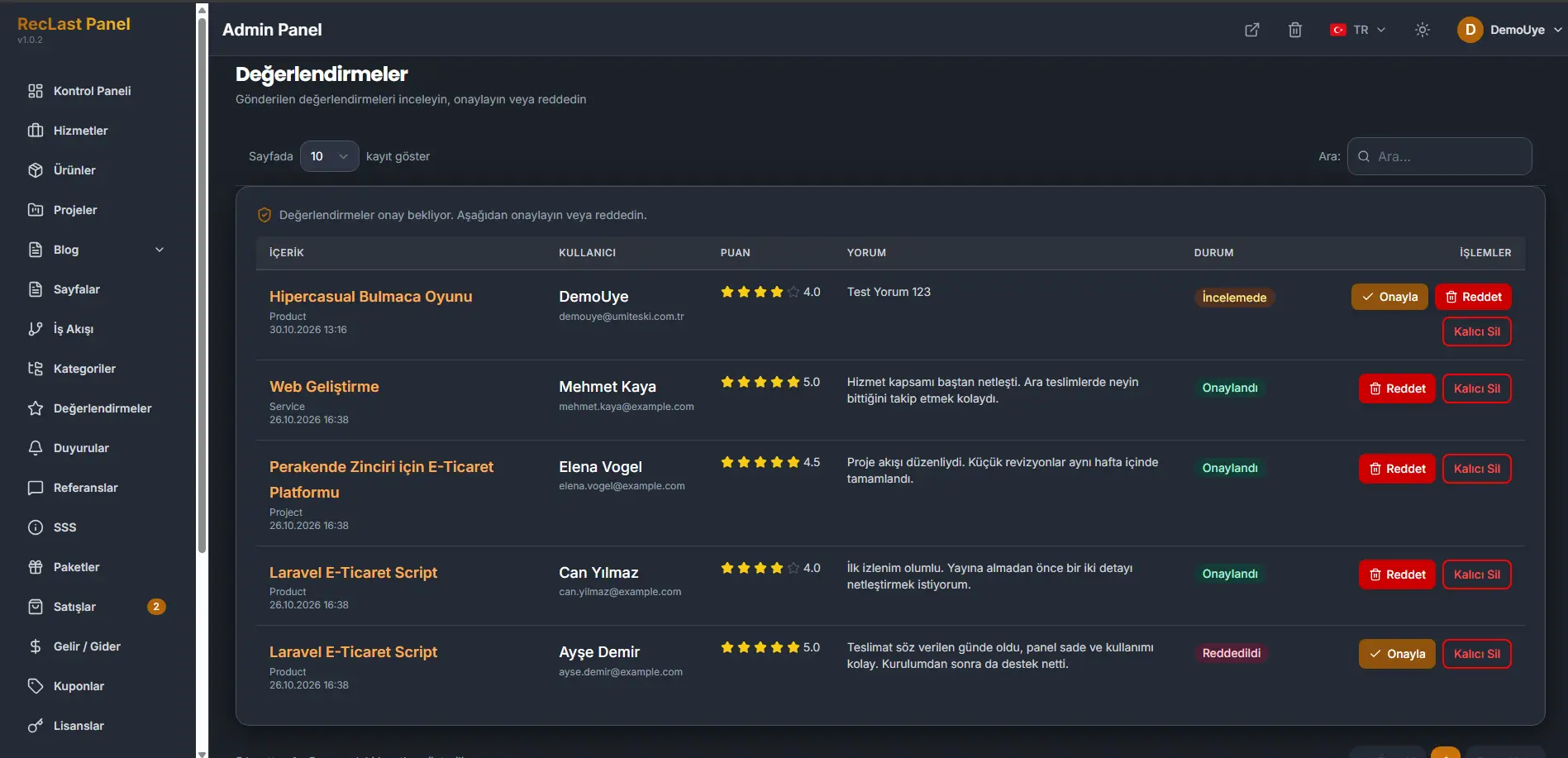
Each row shows:
- Content. The service, product, or project the review belongs to. The line under the title is the kind of record: Product, Service, or Project. The date and time sit under that.
- User. The name of the person who wrote the review, and their email under the name.
- Rating. Stars, and the score next to them.
- Comment. The text of the review.
- Status. In review, Approved, or Rejected.
- Actions. The buttons depend on the status.
In review offers Approve, Reject, and Delete permanently. Approved offers Reject and Delete permanently. Rejected offers Approve and Delete permanently.
Approve makes the review public. Reject keeps it off the public page and leaves the row here as rejected. Delete permanently removes the row.
The line under the table states which rows are on the page, out of the full count. Previous and Next move between pages. The numbers between them are the pages.